

Learn how to:Documentation Index
Fetch the complete documentation index at: https://samsara-showcase.mintlify.app/llms.txt
Use this file to discover all available pages before exploring further.
- Create a basic route.
- Assign a route to a driver or vehicle.
- Adjust the route starting and completion settings for your use case.
- Provide route stop instructions via notes.
- Use external IDs to help sync with an external system.
Create a basic route
The minimum requirements for any route are:- A route name.
- At least two stops that must include
- An address or single-use location. (See Stop Locations).
- A scheduled arrival/departure time.
Assigning a route
To assign a route to a driver or vehicle, either include thedriverId or vehicleId field in the request:
driverId field above with vehicleId.
If neither the driverId nor vehicleId field is assigned, the route will be “unassigned.” You can assign it later by Updating the Route.
Route start and completion settings
You can customize the automatic tracking of your route start time and completion time in two ways:- Setting the route’s starting condition
- Setting the route’s completion condition
settings field of the route. The default settings for a route are:
routeStartingCondition: Valid values:departFirstStop,arriveFirstStoprouteCompletionCondition: Valid values:arriveLastStop,departLastStop
Stop arrival and departure times
When creating routes, each stop requires a schedule to determine when the vehicle is expected to arrive or depart. The first and last stop of a route are special and depending on the route’s starting and completion conditions the first and last stop may require one of an arrival or departure time.First stop
WhenrouteStartingCondition is departFirstStop then scheduledDepartureTime is required.
When routeStartingCondition is arriveFirstStopthen scheduledArrivalTime is required.
Last stop
WhenrouteCompletionCondition is arriveLastStop then scheduledArrivalTime is required.
When routeCompletionCondition is departLastStop then scheduledDepartureTime is required.
Intermediate stops
All other stops must have ascheduledArrivalTime. The scheduledDepartureTime is optional, and, if omitted, will be automatically set to the next stop’s scheduledArrivalTime.
Stops are automatically ordered by scheduled arrival times. It does not matter which order you place them in the array, Samsara will always order them by their scheduled arrival times.
By default, Samsara validates that arrival and departure times cannot overlap. This validation can be disabled in organization wide by navigating to Settings > Dispatch.

TimestampsSee the Timestamps guide for details on working with timestamps.
Route Stop Instructions
Use thenotes field on the route or each route stop to share instructions with the driver. These fields can contain general information such as gate codes or phone numbers, and they can also contain information about the order such as weight, cubes, SKUs.
The notes fields support newline characters: /n and tabs: /t.
Let’s say you want to include the following route stop note:
\n and \t in the string that you provide to the notes field as part of your request:
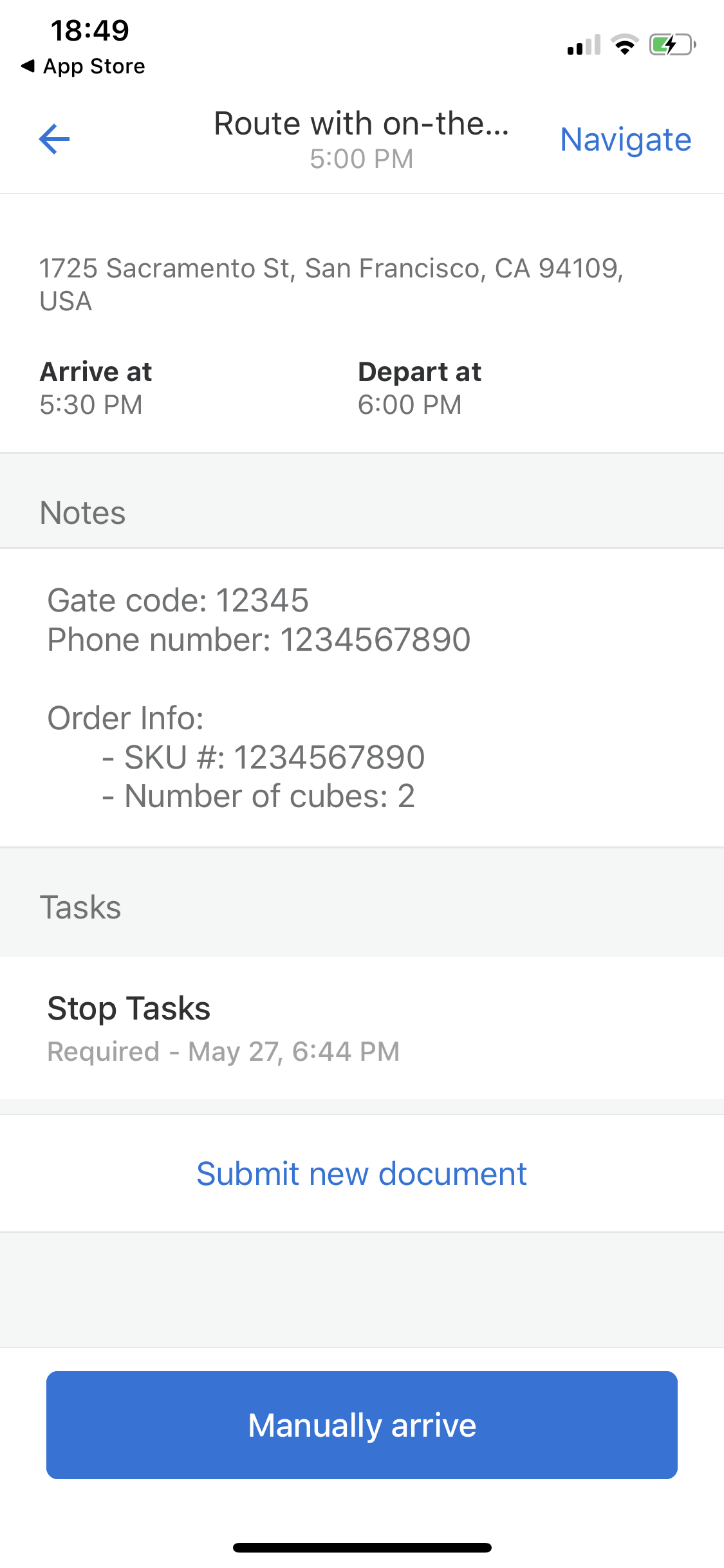
Route Stop TasksSee Creating Stop Tasks to learn how to create interactive driver tasks using Samsara’s Documents feature.(The
notes field described above is only meant for static instructions).